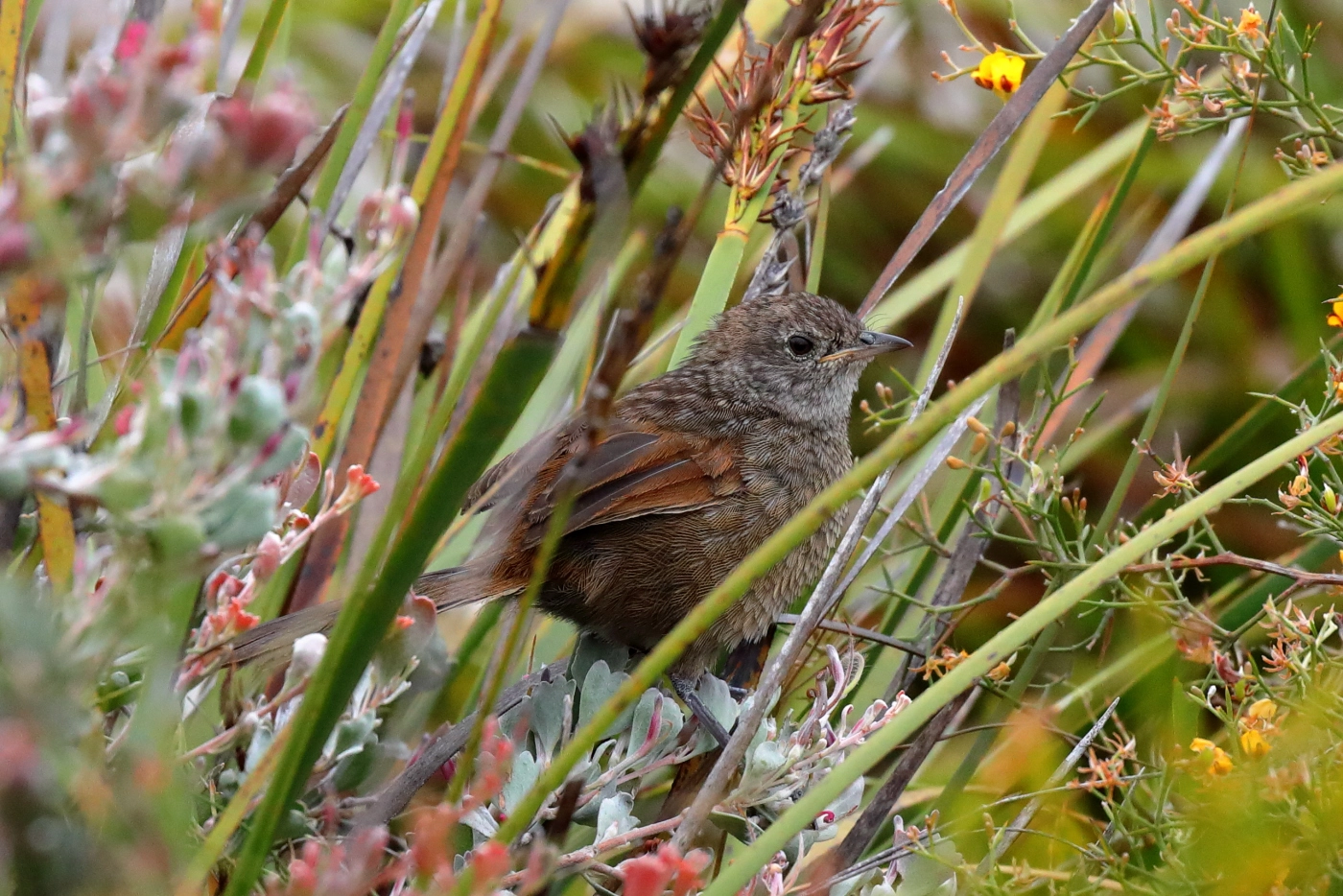
Western Bristlebird

Western Bristlebird (Image ID 34374)
Photographed byNeville Horner on Tue 12th Feb, 2019 and uploaded on Sat 2nd Mar, 2019 .
Resolution1400x934
Viewed642
ID34374
Commenttoo cluttered or is the natural environment OK? just changed from Camera Raw to Canon DPP but concerned the colours are a little bright with Fine Detail picture style selected
EquipmentCanon 5D Mark IV with Canon 100 to 400 f4.5-5.6 L
Locationsouth of Cheynes Beach caravan park, Western Australia
Keywordsjuvenile
You already have an outstanding request to download this image for non-commercial purposes. You may cancel this request by clicking on the button below and waiting for confirmation that your request has been noted. When you have selected all the images that you require, go to 'My Download Requests' (under Photo Gallery) and submit your request by clicking 'Edit/Submit' and filling out the details. You will be advised of the result by email. Note that cookies MUST be enabled for this to work.
You may request download of this image for non-commercial purposes. A request that meets the usage rights of this image will be automatically approved; a request that does not meet the usage rights will be refused, but may (at the Download Manager's discretion) be referred to the photographer. The usage rights of this image are: Use by BirdLife Australia, its branches, groups, affiliates and members. For further details of image usage rights, see here. Request the image by clicking on the button below and waiting for confirmation that your request has been noted. When you have selected all the images that you require, go to 'My Download Requests' (under Photo Gallery) and submit your request by clicking 'Edit/Submit' and filling out the details. You will be advised of the result by email. Note that cookies MUST be enabled for this to work.
Graham Cam2019-03-02 13:34:27When I critique an image, I have a standardised process:
• describe 2-3 aspects of the image that I like,
• identify and discuss the key technical issues/defects which reduce the quality of the image,
• suggestions, which are directed more to the ‘art of photography’.

The last dot point is an important element that is too readily overlooked. At the end of the process the image in question is yours and yours alone. Regardless of the suggestions received from other photographers, any changes you make to the image must be pleasing to your eye. Each of us should endeavour to find our own particular style even though others may be not like that style.

In terms of comments which relate to the technical aspects of the image, these should be considered as they generally identify issues, which when addressed will improve the quality of the image.

This is a delightful image. It is a typical view of this species, half-hidden in vegetation. BLP needs more of these photos for our digital library. The essential features for such images are 1. Ensuring there is a sufficient view of the bird and 2. The bird’s head and eye are sharp and preferably, there is eye contact between the bird and the viewer. 3. The vegetation ideally provides a habitat context. This image provides all three.

The bird is positioned so that 2/3 of the body is in view and sharp. If you look closely at the image you will notice that the focal point is most likely the shoulder region. The eye and bill are sharp, but I notice that the nape feathers appear to be not quite as sharp. This could be due to movement (the EXIF data has not been saved with this image). This is a comment and not a criticism and would not affect the publication of the image. One can clearly identify that the bird is a juvenile.

There are blades in the foreground vegetation that are out of focus, but these are not in distracting positions. The landscape format is ideal for this image, however, I would try reducing the image dimensions to remove a little of the out of focus vegetation on the lower LH and RH corners. A second option is to only move the LH edge so that the obvious foreground blades of vegetation form the LH edge – these blades provide leading lines that draw one’s eyes into the image and the bird , from the lower LH corner. Some judges would argue that the other blades of vegetation, (these are in the same orientation and complement the primary leading line),which exit the RHS lead one’s eyes out of the image, but I find that there is sufficient vegetation entering the RH edge to bring one’s eyes back into the image – so I would ignore any such comments if they arise.

I would be inclined to reduced the space at the top of the image – this will be automatic if you retain the aspect ratio and move the LH edge. The small yellow flower is nice in colour but distracts the viewer’s attention from the bird and really doesn’t add much to the image. If the flower remains after re-cropping ‘content aware’ in PS could be used to remove the flower.

As to your question re the DPP effect. I don’t use DPP, but I do like the colour palette, the intensity of colour and contrast and the detail. I wouldn’t change this if it were my image.

Trust my comment are helpful – Graham Cam
Graham Cam2019-03-02 13:34:30When I critique an image, I have a standardised process:
• describe 2-3 aspects of the image that I like,
• identify and discuss the key technical issues/defects which reduce the quality of the image,
• suggestions, which are directed more to the ‘art of photography’.

The last dot point is an important element that is too readily overlooked. At the end of the process the image in question is yours and yours alone. Regardless of the suggestions received from other photographers, any changes you make to the image must be pleasing to your eye. Each of us should endeavour to find our own particular style even though others may be not like that style.

In terms of comments which relate to the technical aspects of the image, these should be considered as they generally identify issues, which when addressed will improve the quality of the image.

This is a delightful image. It is a typical view of this species, half-hidden in vegetation. BLP needs more of these photos for our digital library. The essential features for such images are 1. Ensuring there is a sufficient view of the bird and 2. The bird’s head and eye are sharp and preferably, there is eye contact between the bird and the viewer. 3. The vegetation ideally provides a habitat context. This image provides all three.

The bird is positioned so that 2/3 of the body is in view and sharp. If you look closely at the image you will notice that the focal point is most likely the shoulder region. The eye and bill are sharp, but I notice that the nape feathers appear to be not quite as sharp. This could be due to movement (the EXIF data has not been saved with this image). This is a comment and not a criticism and would not affect the publication of the image. One can clearly identify that the bird is a juvenile.

There are blades in the foreground vegetation that are out of focus, but these are not in distracting positions. The landscape format is ideal for this image, however, I would try reducing the image dimensions to remove a little of the out of focus vegetation on the lower LH and RH corners. A second option is to only move the LH edge so that the obvious foreground blades of vegetation form the LH edge – these blades provide leading lines that draw one’s eyes into the image and the bird , from the lower LH corner. Some judges would argue that the other blades of vegetation, (these are in the same orientation and complement the primary leading line),which exit the RHS lead one’s eyes out of the image, but I find that there is sufficient vegetation entering the RH edge to bring one’s eyes back into the image – so I would ignore any such comments if they arise.

I would be inclined to reduced the space at the top of the image – this will be automatic if you retain the aspect ratio and move the LH edge. The small yellow flower is nice in colour but distracts the viewer’s attention from the bird and really doesn’t add much to the image. If the flower remains after re-cropping ‘content aware’ in PS could be used to remove the flower.

As to your question re the DPP effect. I don’t use DPP, but I do like the colour palette, the intensity of colour and contrast and the detail. I wouldn’t change this if it were my image.

Trust my comment are helpful – Graham Cam
Neville Horner2019-03-02 17:32:07--Hi Graham,

Settings were 400 mm, Mode 2 lens stabiliser, f7.1, 1/640 second, ISO3200, one shot single point focus, Standard pic style, AWB. I used Auto ISO so I could capture at my desired speed and aperture. The photo was taken early in the morning hence the high ISO.

You were spot on with the point of focus but I dont know why the nape seems less sharp. There was very little wind.

Again comments on cropping much appreciated.

thanks
Neville
Ian Wilson2019-03-02 15:54:24Welcome to BLP Neville,

I agree with Graham's comments regarding the composition of this image.

It is not easy to provided a detailed critique of technical aspects without knowing the exposure parameters which ideally the photographer will include in the equipment field and/or in a full EXIF data summary attached to the image; the reasons for this will become apparent in a moment. DPP is an excellent piece of software for basic RAW adjustment and conversion. It provides RAW conversions with minimal demosaic artefacts, low noise and accurate colours with little effort using a simple workflow. This provides a an excellent 16-bit TIFF for local adjustment and finishing in Photoshop. The choice of Picture Style is important because it determines the default settings for brightness, saturation and sharpness. If it is your aim to produce accurate colours, then the best Picture Style is 'neutral' which in most cases produces colours out of DPP which compare well with a colour-checker test panel. This will depend on the ISO as high ISO images have reduced colour tonal range and in this case it is usually beneficial to apply a small amount of saturation. Picture Style 'standard and 'fine detail' apply some saturation by default which is fine for high ISO images but too much for low ISO images. Without knowing the ISO used to capture your image it is not easy to say whether using Picture Style fine detail was appropriate.

The aperture used to record the image affects the sharpness of fine detail through the impact of the lens modulation transfer function (MTF). When the aperture is closed down the MTF of the lens rolls off more quickly than when wide open so the amount of sharpening required at the beginning of your workflow in DPP (input sharpening) to compensate for this needs to be greater when the aperture is closed down. In DPP you have two algorithms for input sharpening, unsharp mask and Canon sharpening, use the latter for best results. The default input sharpening applied in Picture Style standard is 3 and in fine detail 4 (on a scale of 0-10). This amount of sharpening might be acceptable for an image captured at f/11 but at f/5.6 would produce over-sharpening. This would be exacerbated if you also used the Digital Lens Optimizer (DLO) which also increases sharpness. My advice is not to use Picture Style fine detail but use Picture Style neutral, where the default sharpening is 0, and apply an amount of sharpening to suit the aperture used to record the image. This will be between 2 and 3 depending upon the f/No and whether the DLO was used. As this is a global sharpening (applied to the entire image) you should be able to see the effects of over-sharpening along high contrast edges where over-sharpening will produce a faint halo once the sharpness is greater than about 3. Critical parts of the image that may require extra sharpening can be dealt with using a local adjustment in PS.

I hope this helps answer your query about the appropriate Picture Style. Cheers,

Ian
Neville Horner2019-03-02 17:43:29Hi Ian,

Not sure why the EXIF data did not show up. I processed in DPP and saved as an Exif-JPEG file so I assumed it would be there. Any suggestions here.

In this case I shot using Standard picture style and processed in DPP using Fine Detail. I have only just started using DPP after discovering that my Photoshop CS4 does not support my upgrade to a 5D Mark IV so thanks for your suggestion re Fine Detail. Would you similarly recommend use of Neutral picture style in camera.

thanks
Neville
Neville Horner2019-03-02 17:54:26aha - just discovered the Shooting Setting Info window in DPP save with default remove shooting info
Neville Horner2019-03-02 17:54:30aha - just discovered the Shooting Setting Info window in DPP save with default remove shooting info
Ian Wilson2019-03-02 21:12:08Hi Neville,

I use Picture Style standard in camera because whenever I tried to use neutral I kept having panic attacks when I checked the image on the camera LCD screen. Picture Style neutral has sharpness = 0 so when you look at an image on the camera LCD screen it looks 'soft' and that always caused me to panic, wondering what was wrong! So I shoot with Picture Style standard ensuring that when I review an image on the camera LCD, the sharpness (=3) looks about right and I avoid panic attacks. When I import the image into DPP I change to Picture Style neutral and fine tune the sharpness.

Now that we know your shooting parameters, I can tell you that the optimum DPP sharpness for f/7.1 is about sharpness = 2.5 and because you have needed to use a high ISO (= 3200) a little saturation (about 1 unit in DPP) will be beneficial to make up for the reduced tonal range. About the right amount of saturation was provided by default when you used Picture Style fine detail. Like all sophisticated software, it takes a little time to learn how to get the best out of DPP so don't hesitate to ask further questions. On the BLP website under Resources/ Our Articles you will find contributions by me and Glenn Pure on how to best use DPP for RAW adjustment and conversion.

Cheers, Ian
Previous95/324 in Critique GalleryNext
Previous3/14 by Neville HornerNext
Previous11/22 of Western BristlebirdNext
Previous34/89 of BristlebirdsNext
Previous15081/43106 OverallNext
Use the arrows at the left and Right hand side of this page to display the Next/Previous photographs in that group, or click on one of the blue links above to start a slide show in that group (group slide shows are only allowed if there are less than 1000 images in the group).